c# ile Dizideki Sayilari Siralama

Cok basit bir yontem ile hem buyukten kucuge hem de kucukten buyuge siralayabilirsiniz;

int[] sayi = new int[5];
for (int i = 0; i < sayi.Length; i++) { Console.Write("{0}.Sayıyı Giriniz = ", i); sayi[i] = Convert.ToInt32(Console.ReadLine()); } Array.Sort(sayi); Array.Reverse(sayi); foreach (int dizi in sayi) { Console.WriteLine(dizi); } Console.ReadLine();
For dongusu ile asagidaki sekilde yapabilirsiniz;

int[] sayi = new int[5];
for (int i = 0; i < sayi.Length; i++) { Console.Write("{0}.Sayıyı Giriniz = ", i); sayi[i] = Convert.ToInt32(Console.ReadLine()); } for (int i = 1; i < sayi.Length; i++) { for (int j = i; j >= 1; j--)
{
if (sayi[j] > sayi[j - 1])
{
gecici = sayi[j];
sayi[j] = sayi[j - 1];
sayi[j - 1] = gecici;
}
}
}

foreach (int dizi in sayi)
{
Console.WriteLine(dizi);
}
Console.ReadLine();
Dizi icindeki sayilari Linq ile siralama ise;


int[] sayi = new int[5];
for (int i = 0; i < sayi.Length; i++) { Console.Write("{0}.Sayıyı Giriniz = ", i); sayi[i] = Convert.ToInt32(Console.ReadLine()); } var sayilar = from s in sayi orderby s descending select s; foreach (int dizi in sayilar) { Console.WriteLine(dizi); } Console.ReadLine();
Yayınlanan <a href="https://www.mahmuttalhakoz.com/blog/index.php/category/csharp/" rel="category tag">C#</a> Takip edilen <a href="https://www.mahmuttalhakoz.com/blog/index.php/tag/c-dizi-buyukten-kucuge/" rel="tag">c# dizi buyukten kucuge</a>, <a href="https://www.mahmuttalhakoz.com/blog/index.php/tag/c-dizi-kucukten-buyuge/" rel="tag">c# dizi kucukten buyuge</a>, <a href="https://www.mahmuttalhakoz.com/blog/index.php/tag/c-dizi-linq-ile-siralama/" rel="tag">c# dizi linq ile siralama</a>, <a href="https://www.mahmuttalhakoz.com/blog/index.php/tag/c-dizi-siralama/" rel="tag">c# dizi siralama</a>, <a href="https://www.mahmuttalhakoz.com/blog/index.php/tag/c-linq-ile-siralama/" rel="tag">c# linq ile siralama</a>, <a href="https://www.mahmuttalhakoz.com/blog/index.php/tag/c-sayi-siralama/" rel="tag">c# sayi siralama</a> Bir yorum yapın

Rakamlarinin Kupleri Toplami Kendisine Esit Olan Sayiyi Bulma


Math.Pow(ussualinacaksayi,us);

Mah.Pow sinifini sayinin ussunu almak icin kullaniyoruz.

for (int i = 10; i < 1000; i++) { int deger = 0; string ilk = "", ikinci = "", ucuncu = ""; int sayac = 0; foreach (char c in i.ToString()) { if (sayac == 0) { ilk = Convert.ToString(c); } else if (sayac == 1) { ikinci = Convert.ToString(c); } else { ucuncu = Convert.ToString(c); } sayac++; } if (ucuncu == "") { deger = Convert.ToInt32(Math.Pow(Convert.ToDouble(ilk), 3) + Math.Pow(Convert.ToDouble(ikinci), 3)); } else { deger = Convert.ToInt32(Math.Pow(Convert.ToDouble(ilk), 3) + Math.Pow(Convert.ToDouble(ikinci), 3) + Math.Pow(Convert.ToDouble(ucuncu), 3)); } if (deger == i) { Console.WriteLine(i.ToString()); } }

Yayınlanan <a href="https://www.mahmuttalhakoz.com/blog/index.php/category/csharp/" rel="category tag">C#</a> Takip edilen <a href="https://www.mahmuttalhakoz.com/blog/index.php/tag/c/" rel="tag">c#</a>, <a href="https://www.mahmuttalhakoz.com/blog/index.php/tag/c-kupleri-toplami/" rel="tag">c# kupleri toplami</a>, <a href="https://www.mahmuttalhakoz.com/blog/index.php/tag/rakamlarinin-kupleri-toplami-kendisine-esit-olan-sayiyi-bulma/" rel="tag">Rakamlarinin Kupleri Toplami Kendisine Esit Olan Sayiyi Bulma</a> Bir yorum yapın

c# ile Asal Sayi Kontrolu

Girilen sayinin asal sayi olup olmadiginin kontrolunu yapan kod blogu;

int sayi = Convert.ToInt32(Console.ReadLine());
int sayac = 0;
for (int i = 2; i < sayi; i++) { if (sayi % i == 0) { Console.WriteLine(sayi+"/" + i +" = "+ sayi % i); //Sayinin carpanlari sayac++; } } if (sayac == 0) { Console.WriteLine("Girdiginiz sayi asal"); } else { Console.WriteLine("Girilen sayi asal degil"); }

Yayınlanan <a href="https://www.mahmuttalhakoz.com/blog/index.php/category/csharp/" rel="category tag">C#</a> Takip edilen <a href="https://www.mahmuttalhakoz.com/blog/index.php/tag/asal-sayi-kontrolu/" rel="tag">asal sayi kontrolu</a>, <a href="https://www.mahmuttalhakoz.com/blog/index.php/tag/c-asal-sayi/" rel="tag">c# asal sayi</a>, <a href="https://www.mahmuttalhakoz.com/blog/index.php/tag/c-ile-asal-sayi-bulma/" rel="tag">c# ile asal sayi bulma</a> Bir yorum yapın

c# Ile Dosya Arama


string Dizin="c:\\"; //dizini belirliyoruz
bool Durum = false;

DirectoryInfo di = new DirectoryInfo(Dizin);
FileInfo[] dosyaadlari = di.GetFiles(); //dosyalari diziye aktariyoruz

foreach (FileInfo dosya in dosyaadlari)
{
StreamReader SR = new StreamReader(Dizin + "\\" + dosya.Name);  // eger dosya varsa dongu icine girip dosyaya mudahale edebiliyoruz
Durum = true;
}
if (!Durum)
{
MessageBox.Show("Aradiginiz dosya bulunamadi");
}

Yayınlanan <a href="https://www.mahmuttalhakoz.com/blog/index.php/category/csharp/" rel="category tag">C#</a> Takip edilen <a href="https://www.mahmuttalhakoz.com/blog/index.php/tag/c/" rel="tag">c#</a>, <a href="https://www.mahmuttalhakoz.com/blog/index.php/tag/c-dosya-arama/" rel="tag">c# dosya arama</a>, <a href="https://www.mahmuttalhakoz.com/blog/index.php/tag/directoryinfo/" rel="tag">directoryinfo</a>, <a href="https://www.mahmuttalhakoz.com/blog/index.php/tag/dosya-arama/" rel="tag">dosya arama</a>, <a href="https://www.mahmuttalhakoz.com/blog/index.php/tag/fileinfo/" rel="tag">fileinfo</a> Bir yorum yapın

Sözlük – MTK

Sözlük – MTK

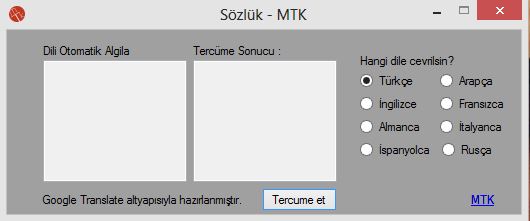
Basit ve kullanışlı; Google Translate altyapısı kullanılarak hazırlanan çevrimiçi sözlük programı. Bu program ile Google Translate’in desteklediği tüm dillerden aşağıdaki dillere çeviriler yapabilirsiniz;
Türkçe
İngilizce
Almanca
İspanyolca
Arapça
Fransızca
İtalyanca
Rusça

Sözlük Programını İndir(660 KB)

Yayınlanan <a href="https://www.mahmuttalhakoz.com/blog/index.php/category/csharp/" rel="category tag">C#</a>, <a href="https://www.mahmuttalhakoz.com/blog/index.php/category/projelerim/" rel="category tag">Projelerim</a> Takip edilen <a href="https://www.mahmuttalhakoz.com/blog/index.php/tag/almanca/" rel="tag">almanca</a>, <a href="https://www.mahmuttalhakoz.com/blog/index.php/tag/arapca/" rel="tag">arapça</a>, <a href="https://www.mahmuttalhakoz.com/blog/index.php/tag/c/" rel="tag">c#</a>, <a href="https://www.mahmuttalhakoz.com/blog/index.php/tag/fransizca/" rel="tag">fransızca</a>, <a href="https://www.mahmuttalhakoz.com/blog/index.php/tag/ingilizce/" rel="tag">ingilizce</a>, <a href="https://www.mahmuttalhakoz.com/blog/index.php/tag/ispanyolca/" rel="tag">ispanyolca</a>, <a href="https://www.mahmuttalhakoz.com/blog/index.php/tag/italyanca/" rel="tag">italyanca</a>, <a href="https://www.mahmuttalhakoz.com/blog/index.php/tag/rusca/" rel="tag">rusça</a>, <a href="https://www.mahmuttalhakoz.com/blog/index.php/tag/sozluk/" rel="tag">sözlük</a>, <a href="https://www.mahmuttalhakoz.com/blog/index.php/tag/turkce/" rel="tag">türkçe</a> 2 Yorum

İstanbul’u İzliyorum – MTK

İstanbul’u İzliyorum

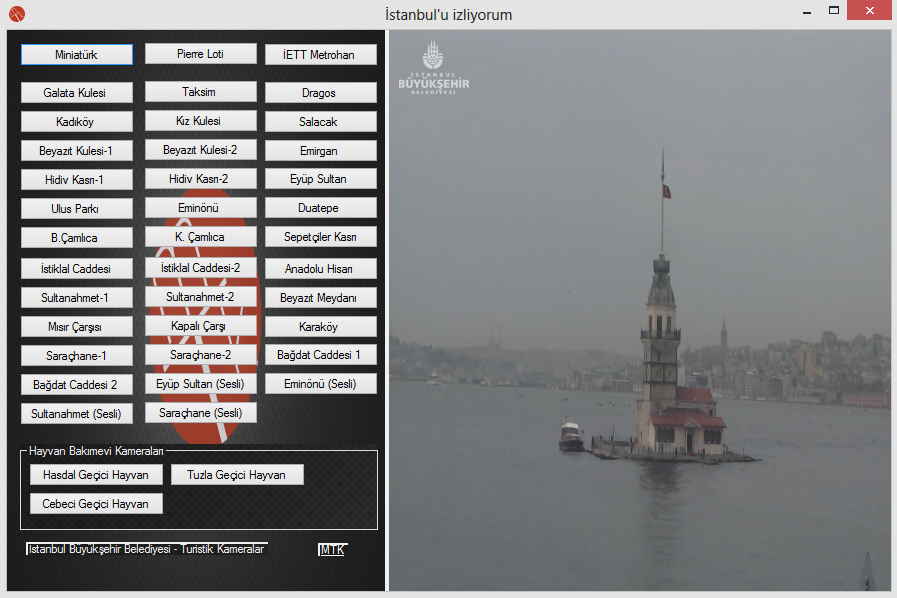
İstanbul’un çeşitli bölgelerinden sesli ve sessiz canlı kamera görüntülerini izleyebilirsiniz. Programda görüntüler İstanbul Büyükşehir Belediyesi Turistik Kameralarından sağlanmaktadır.

İstanbul’u İzliyorum(970 KB)

Kodlardan bir kesit;
private void button30_Click(object sender, EventArgs e)
{
webBrowser1.Navigate("http://tks.ibb.gov.tr/noc-player.php?id=83&w=600&h=338");
}

Yayınlanan <a href="https://www.mahmuttalhakoz.com/blog/index.php/category/csharp/" rel="category tag">C#</a>, <a href="https://www.mahmuttalhakoz.com/blog/index.php/category/projelerim/" rel="category tag">Projelerim</a> Takip edilen <a href="https://www.mahmuttalhakoz.com/blog/index.php/tag/canli-istanbul-izle/" rel="tag">canlı istanbul izle</a>, <a href="https://www.mahmuttalhakoz.com/blog/index.php/tag/istanbul-izle/" rel="tag">istanbul izle</a>, <a href="https://www.mahmuttalhakoz.com/blog/index.php/tag/istanbulu-izliyorum/" rel="tag">istanbulu izliyorum</a>, <a href="https://www.mahmuttalhakoz.com/blog/index.php/tag/mtk/" rel="tag">mtk</a> Bir yorum yapın

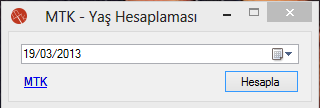
Yaş Hesaplama Programı


Yaş hesaplaması, doğum gününüze kaç gün kaldığını açıklayan yazılım.

Yaş Hesaplaması(345 KB)

Yayınlanan <a href="https://www.mahmuttalhakoz.com/blog/index.php/category/csharp/" rel="category tag">C#</a>, <a href="https://www.mahmuttalhakoz.com/blog/index.php/category/projelerim/" rel="category tag">Projelerim</a> Takip edilen <a href="https://www.mahmuttalhakoz.com/blog/index.php/tag/yas-hesaplama/" rel="tag">yaş hesaplama</a>, <a href="https://www.mahmuttalhakoz.com/blog/index.php/tag/yas-hesaplama-c/" rel="tag">yaş hesaplama c#</a>, <a href="https://www.mahmuttalhakoz.com/blog/index.php/tag/yas-hesaplama-programi/" rel="tag">yaş hesaplama programı</a> Bir yorum yapın

GridView ile Edit, CancelEdit, Update, Delete ve Select Kullanimi

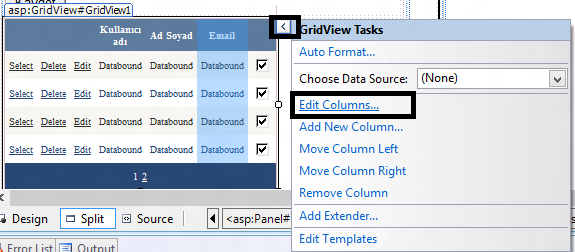
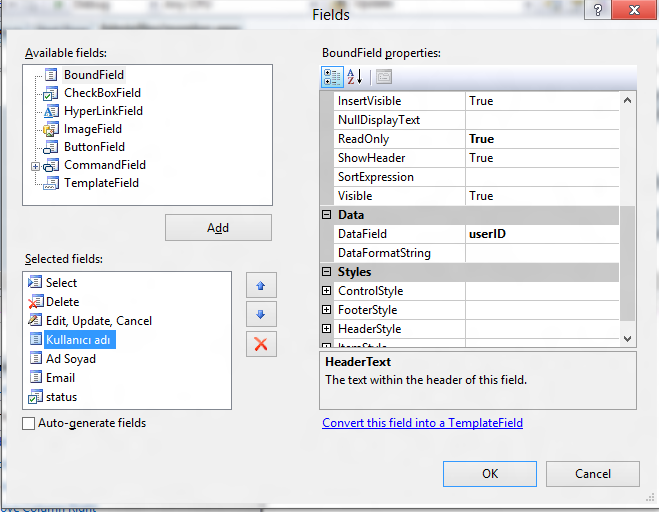
Merhaba arkadaslar, GridView kullanimini kisaca inceleyecegiz. GridView’e veriyi cekmeden once “AutoGenerateColumns=”False”” olarak ayarliyoruz ve gosterilmesini istedigimiz sutunlari el ile ekliyoruz. (Resim 1, Resim 2)

Resim 2’de ekledigimiz “BoundField” nesnelerinin “DataField” degerlerine veritabanindaki tablomuzdan gosterilmesini istediginiz sutun adlarini giriyoruz. Degistirilmesini istemediginiz nesnelerin (Id gibi) “ReadOnly” ozelligini “True” yapmayi unutmayin.

Simdi veritabanindan verilerimizi cekiyoruz. Baglanti cumlelerini yazmiyorum.

public void GetAllTest()
{
ConnectionControl();
SqlDataAdapter Da = new SqlDataAdapter("SELECT * FROM AllTests",myConnection);
DataSet Ds = new DataSet();
Da.Fill(Ds);

GridView1.DataSource=Ds;
GridView1.DataBind();
}

GridView’e veriyi cektik. GridView’de kullanacagimiz olaylar;

  • onrowcancelingedit
  • onrowdeleting
  • onrowediting
  • onrowupdating
  • onselectedindexchanging

Olaylar su sekilde kodlanacak;

//Edit Cancel
protected void GridView1_RowCancelingEdit(object sender, GridViewCancelEditEventArgs e)
{
GridView1.EditIndex = -1;
GetAllTest();
}
//Delete
protected void GridView1_RowDeleting(object sender, GridViewDeleteEventArgs e)
{
ConnectionControl();

SqlCommand Cmd = new SqlCommand("DELETE FROM Users WHERE userID=@userId", myConnection);
Cmd.Parameters.Add("@userId",SqlDbType.Int).Value = Convert.ToInt32(GridView1.Rows[e.RowIndex].Cells[3].Text);
Cmd.ExecuteNonQuery();

GetAllTest();
}
//Edit
protected void GridView1_RowEditing(object sender, GridViewEditEventArgs e)
{
GridView1.EditIndex = e.NewEditIndex;
GetAllTest();
}
//Update
protected void GridView1_RowUpdating(object sender, GridViewUpdateEventArgs e)
{
TextBox adsoyad = new TextBox();
adsoyad = (TextBox)GridView1.Rows[e.RowIndex].Cells[4].Controls[0];
TextBox email = new TextBox();
email = (TextBox)GridView1.Rows[e.RowIndex].Cells[5].Controls[0];
CheckBox onay = new CheckBox();
onay = (CheckBox)GridView1.Rows[e.RowIndex].Cells[6].Controls[0];
bool durum=false;
if (onay.Checked) durum = true;
else durum = false;

ConnectionControl();

SqlCommand Cmd = new SqlCommand("UPDATE users SET adsoyad=@adsoyad,email=@email,status=@durum WHERE userID=@userId", myConnection);
Cmd.Parameters.Add("@adsoyad",SqlDbType.NVarChar).Value = adsoyad.Text;
Cmd.Parameters.Add("@email",SqlDbType.NVarChar).Value = email.Text;
Cmd.Parameters.Add("@durum",SqlDbType.Bit).Value = durum;
Cmd.Parameters.Add("@userId",SqlDbType.Int).Value = Convert.ToInt32(GridView1.Rows[e.RowIndex].Cells[3].Text);
cmd.ExecuteNonQuery();

DataSet Ds = new DataSet();
SqlDataAdapterDa = new SqlDataAdapter(SELECT * FROM AllTests, myConnection);
Da.Fill(Ds);
GridView1.EditIndex = -1;
GridView1.DataSource = Ds;
GridView1.DataBind();

con.Close();
}

Yayınlanan <a href="https://www.mahmuttalhakoz.com/blog/index.php/category/csharp/" rel="category tag">C#</a> Takip edilen <a href="https://www.mahmuttalhakoz.com/blog/index.php/tag/canceledit/" rel="tag">CancelEdit</a>, <a href="https://www.mahmuttalhakoz.com/blog/index.php/tag/delete-ve-select-kullanimi/" rel="tag">Delete ve Select Kullanimi</a>, <a href="https://www.mahmuttalhakoz.com/blog/index.php/tag/gridview/" rel="tag">gridview</a>, <a href="https://www.mahmuttalhakoz.com/blog/index.php/tag/gridview-ile-edit/" rel="tag">GridView ile Edit</a>, <a href="https://www.mahmuttalhakoz.com/blog/index.php/tag/gridview1_rowcancelingedit/" rel="tag">GridView1_RowCancelingEdit</a>, <a href="https://www.mahmuttalhakoz.com/blog/index.php/tag/gridview1_rowdeleting/" rel="tag">GridView1_RowDeleting</a>, <a href="https://www.mahmuttalhakoz.com/blog/index.php/tag/gridview1_rowediting/" rel="tag">GridView1_RowEditing</a>, <a href="https://www.mahmuttalhakoz.com/blog/index.php/tag/gridview1_rowupdating/" rel="tag">GridView1_RowUpdating</a>, <a href="https://www.mahmuttalhakoz.com/blog/index.php/tag/onrowcancelingedit/" rel="tag">onrowcancelingedit</a>, <a href="https://www.mahmuttalhakoz.com/blog/index.php/tag/onrowdeleting/" rel="tag">onrowdeleting</a>, <a href="https://www.mahmuttalhakoz.com/blog/index.php/tag/onrowediting/" rel="tag">onrowediting</a>, <a href="https://www.mahmuttalhakoz.com/blog/index.php/tag/onrowupdating/" rel="tag">onrowupdating</a>, <a href="https://www.mahmuttalhakoz.com/blog/index.php/tag/onselectedindexchanging/" rel="tag">onselectedindexchanging</a>, <a href="https://www.mahmuttalhakoz.com/blog/index.php/tag/update/" rel="tag">Update</a> Bir yorum yapın

Form icindeki istenen nesnelere ulasma

Form, Panel, GroupBox vb. bilesenlerin iclerinde bulunan bilesenlere dongu yardimi ile ulasacagiz.


foreach (TextBox Txt in panel1.Controls) //panel1 kismini ilgili bilesen adiyla degistirin
{
Txt.Text= "textBox'a yeni deger ata";
//ya da
MessageBox.Show(Txt.Text); //textboxdaki degeri okut
}

Yayınlanan <a href="https://www.mahmuttalhakoz.com/blog/index.php/category/csharp/" rel="category tag">C#</a> Takip edilen <a href="https://www.mahmuttalhakoz.com/blog/index.php/tag/bilesen/" rel="tag">bilesen</a>, <a href="https://www.mahmuttalhakoz.com/blog/index.php/tag/controls/" rel="tag">controls</a>, <a href="https://www.mahmuttalhakoz.com/blog/index.php/tag/foreach/" rel="tag">foreach</a>, <a href="https://www.mahmuttalhakoz.com/blog/index.php/tag/form/" rel="tag">form</a>, <a href="https://www.mahmuttalhakoz.com/blog/index.php/tag/form1-controls/" rel="tag">form1.controls</a>, <a href="https://www.mahmuttalhakoz.com/blog/index.php/tag/groupbox/" rel="tag">groupbox</a>, <a href="https://www.mahmuttalhakoz.com/blog/index.php/tag/groupbox1-controls/" rel="tag">groupbox1.controls</a>, <a href="https://www.mahmuttalhakoz.com/blog/index.php/tag/panel/" rel="tag">panel</a>, <a href="https://www.mahmuttalhakoz.com/blog/index.php/tag/panel1-controls/" rel="tag">panel1.controls</a> Bir yorum yapın

DataTable ve Dataset Column DataType Degisimi

DataTable ve DataSet’de eklenen sutunun veri tipini degistirmek icin;


Data Table icin;


DataTable Dt = new DataTable();
Dt.Columns.Add("A");
Dt.Columns[0].DataType = typeof(Int32);

DataSet icin;


DataSet Ds = new DataSet();
Ds.Tables[0].Columns[0].DataType = typeof(Int32);

Yayınlanan <a href="https://www.mahmuttalhakoz.com/blog/index.php/category/csharp/" rel="category tag">C#</a> Takip edilen <a href="https://www.mahmuttalhakoz.com/blog/index.php/tag/datagridview-datatype/" rel="tag">DataGridview DataType</a>, <a href="https://www.mahmuttalhakoz.com/blog/index.php/tag/dataset-datatype/" rel="tag">DataSet DataType</a>, <a href="https://www.mahmuttalhakoz.com/blog/index.php/tag/datatable-datatype/" rel="tag">DataTable DataType</a>, <a href="https://www.mahmuttalhakoz.com/blog/index.php/tag/datatable-ve-dataset-column-datatype-degisimi/" rel="tag">DataTable ve Dataset Column DataType Degisimi</a>, <a href="https://www.mahmuttalhakoz.com/blog/index.php/tag/datatype/" rel="tag">DataType</a>, <a href="https://www.mahmuttalhakoz.com/blog/index.php/tag/datatype-change/" rel="tag">DataType Change</a> Bir yorum yapın