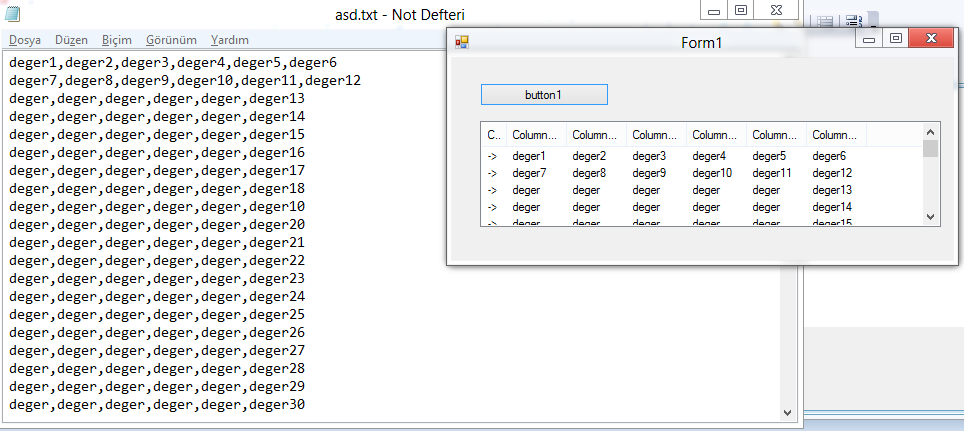
ListView ile NotePad uzerinden veri cekmek

– ListView objesine 7 tane sutun ekliyoruz. ( Not defterinde her satirda 6 ayrac (,) iceren veri var)
– ListView objesinin View ozeligini “Details” olarak degistiriyoruz.

DialogResult Dr = openFileDialog1.ShowDialog();
if (Dr == DialogResult.OK)
{

StreamReader dosya;
string yazi;
dosya = File.OpenText(openFileDialog1.FileName);
yazi = dosya.ReadLine();
while (yazi != null)
{

int i = 0;
string[] dizi = new string[6];
foreach (string deger in yazi.Split(','))
{
dizi[i] = deger;
i++;
}
ListViewItem item = new ListViewItem("->");
item.SubItems.AddRange(dizi);
listView1.Items.Add(item);
yazi = dosya.ReadLine();
}
dosya.Close();
}

Yayınlanan <a href="https://www.mahmuttalhakoz.com/blog/index.php/category/csharp/" rel="category tag">C#</a> Takip edilen <a href="https://www.mahmuttalhakoz.com/blog/index.php/tag/ayrac/" rel="tag">ayrac</a>, <a href="https://www.mahmuttalhakoz.com/blog/index.php/tag/listview/" rel="tag">listview</a>, <a href="https://www.mahmuttalhakoz.com/blog/index.php/tag/listview-details/" rel="tag">listview.details</a>, <a href="https://www.mahmuttalhakoz.com/blog/index.php/tag/notepad/" rel="tag">notepad</a>, <a href="https://www.mahmuttalhakoz.com/blog/index.php/tag/subitem/" rel="tag">subitem</a>, <a href="https://www.mahmuttalhakoz.com/blog/index.php/tag/veri/" rel="tag">veri</a>, <a href="https://www.mahmuttalhakoz.com/blog/index.php/tag/veri-cekmek/" rel="tag">veri cekmek</a> Bir yorum yapın